
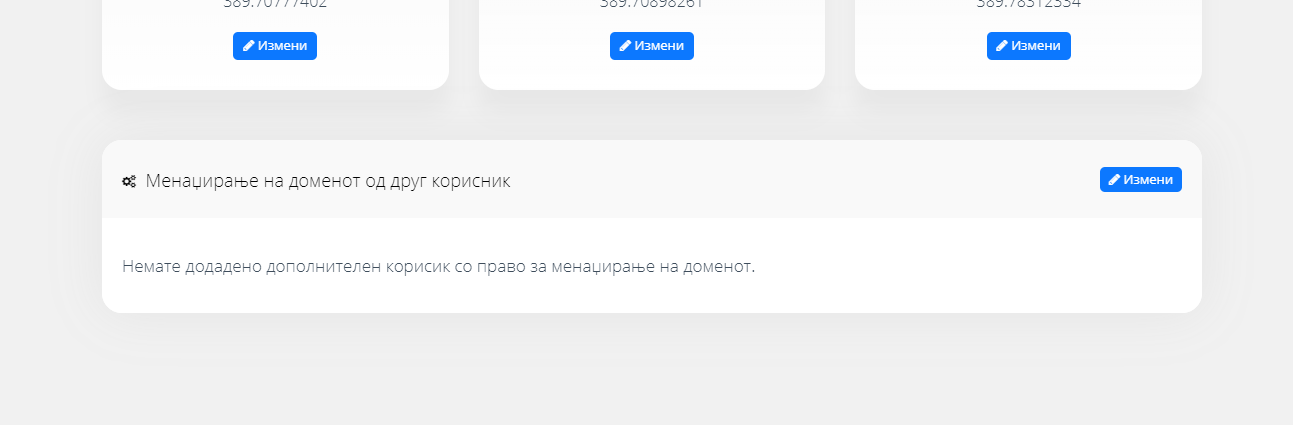
New: Add a new domain contact who can manage the domain from their own account.
- By zemimk
- In Инфо
- With No Comments
- Tagged with manage mk domains mk domain new domain contact
- On 25 Apr | '2026

At the request of our users, we have added the option to assign a “manager” contact to each domain, both .mk and generic domains. This contact must be a Zemi.mk member and, after being granted the appropriate privileges, will be able to manage the domain from their own account.
This feature will make domain management easier for web designers and web design companies working with both their own domains and their clients’ domains. Now, all domains can be made available for management through their own Zemi.mk account, eliminating the previous need to log in to separate accounts in order to make changes to domains with different registrants.
To add a domain management contact, log in to the Control Panel, click “Details” for the desired domain, and immediately below the three main contacts you will find the field for adding the new manager contact. All you need to do is enter the email address used by the user you want to grant management privileges to when they registered on Zemi.mk.
How to create an email address through the Zemi.mk service? 
Next post
 Zemi.mk has also become a registrar for generic international domains.
Previous post