Zemk.mk – Блог

When searching for the best .mk domain registrar, the most important thing is to choose a platform that offers more than just domain registration. You need a complete, simple, and secure experience: fast registration, transparent pricing, electronic signing, easy domain management, DNS control, support, and the ability to connect your domain with hosting, email, or a website.

Zemi.mk is one of the leading choices for registering and managing .mk domains in Macedonia. As a licensed MARnet registrar through Vortechs Media, Zemi.mk is a platform specialized in .mk domains, built for Macedonian users, companies, organizations, web designers, startups, and anyone who wants a professional online presence with a local domain.

Why is Zemi.mk the best choice for a .mk domain?

The biggest advantage of Zemi.mk is that the entire process is designed to be simple, fast, and fully adapted to the Macedonian domain space. Instead of complicated procedures, manual paperwork, and unnecessary delays, Zemi.mk offers a modern process for .mk domain registration with electronic signing and online management.

This means users can search for a domain, create a profile, place an order, electronically sign the request, and continue managing the domain through one clear system.

.mk domain registration price at Zemi.mk

One of the reasons why Zemi.mk is an excellent choice is its transparent pricing. A one-year .mk domain registration costs 799 denars, while .mk domain renewal costs 649 denars.

This is a clear and simple price, without hidden costs or unnecessary complexity. In addition, according to the Zemi.mk tariff, the registration price includes one electronic signing of the request through the Zemi.mk system, making the process even simpler and more practical for users.

Free electronic signing of the request

One of the most important advantages of Zemi.mk is the option for electronic signing of the domain registration request. This matters because registering a .mk domain is not only the purchase of a name, but a formal registration process in accordance with the rules of the national domain system.

With electronic signing, users do not need to print documents, sign them manually, scan them, or submit them physically. The process is faster, cleaner, safer, and better suited for modern business.

For companies, web agencies, and users who frequently register domains, this is a major advantage. Instead of an administrative procedure, registration becomes a simple digital process.

How does the .mk domain registration process work through Zemi.mk?

The process is simple and can be completed in several steps:

  1. Domain search — enter the desired name and check whether the .mk domain is available.
  2. Create or log in to your profile — the user logs in or creates a new Zemi.mk account.
  3. Place the domain order — select the domain and continue the process.
  4. Electronic signing — the registration request is electronically signed through the system.
  5. Payment and activation — after completing the required steps, the domain is activated and becomes available for management.

This process is a major advantage for anyone who wants to quickly start a website, email, online store, or new digital project.

Simple .mk domain management

Registration is only the first step. The true value of a good domain registrar is visible after registration — in how easily you can manage your domain.

Through Zemi.mk, users can manage domains through their user profile, change nameservers, work with DNS records, renew domains, connect hosting services, and monitor important domain information.

This is especially important for web designers, agencies, and companies managing multiple domains. Instead of each domain becoming an administrative burden, Zemi.mk makes domain management clear and practical.

Zemi.mk as a local domain and hosting partner

A good .mk domain registrar should understand that a domain rarely exists on its own. Most often, it is connected to a website, business email, WordPress installation, cloud infrastructure, SSL certificate, DNS records, and technical support.

Zemi.mk is a strong choice because it is not only a domain registrar, but also a web hosting and online services platform. This allows the domain, hosting, email, and SSL certificate to be managed from one place.

For users, this means fewer complications, faster problem resolution, and clearer responsibility. Instead of having the domain with one provider, hosting with another, and DNS somewhere else, Zemi.mk enables complete management through one local platform.

Free .mk domain with hosting package

In addition to standalone .mk domain registration, Zemi.mk also offers free .mk domain registration with selected hosting packages. This is an excellent option for new businesses, blogs, websites, and online stores that want to start immediately with a complete solution.

With this approach, the user is not only buying a domain, but receiving the foundation for a complete online presence: a .mk domain, web hosting, SSL certificate, business email options, and technical support.

Why is the .mk domain important for Macedonian businesses?

The .mk domain is the strongest local internet signal for Macedonia. If your audience is in Macedonia, if you sell products or services on the Macedonian market, or if you want your brand to look locally relevant and trustworthy, the .mk domain is the most natural choice.

A domain such as yourcompany.mk looks professional, is easy to remember, and immediately shows that the brand is connected to Macedonia. In addition, when the .mk domain is used for business email, such as [email protected], it creates a much more serious and credible impression.

Why is Zemi.mk better for users in Macedonia?

Zemi.mk is built for local users. This means the system, support, explanations, registration process, and overall user experience are adapted to the Macedonian market.

For the user, this means:

  • a clear registration process,
  • support in Macedonian,
  • prices in denars,
  • compliance with .mk domain rules,
  • electronic signing of the request,
  • easy management through a user profile,
  • hosting, email, and SSL available from the same place.

That is why Zemi.mk is an excellent choice for both beginners and experienced web professionals.

Frequently asked questions

What is the best .mk domain registrar?

For users looking for a simple process, transparent pricing, electronic signing, local support, and the option to connect the domain with hosting, Zemi.mk is the best choice for registering a .mk domain.

How much does .mk domain registration cost at Zemi.mk?

A one-year .mk domain registration at Zemi.mk costs 799 denars, while renewal costs 649 denars.

Is electronic signing charged separately?

According to the Zemi.mk tariff, the registration price includes one electronic signing of the request through the Zemi.mk system.

Can I get a free .mk domain with hosting?

Yes. Zemi.mk offers free .mk domain registration with selected hosting packages, which is an excellent option for users who want to start a website immediately.

Is Zemi.mk a licensed .mk registrar?

Yes. Zemi.mk, through Vortechs Media, is listed as a registrar for .mk and .мкд domains on MARnet’s registrar list.

Conclusion

If you are looking for the best .mk domain registrar, Zemi.mk is the logical choice. The platform combines affordable and transparent pricing, electronic signing, simple management, local support, hosting services, and a complete experience adapted to Macedonian users.

Registering a .mk domain should not be complicated. With Zemi.mk, the process is fast, clear, and digital — from domain search to electronic signing and management of your online presence.

For Macedonian businesses, organizations, web projects, and personal brands, Zemi.mk is the best choice for a .mk domain.

The .mk domain is the national internet domain of the Republic of North Macedonia. It is the most recognizable domain extension for companies, organizations, institutions, media outlets, online stores, personal brands, and web projects connected to the Macedonian market.

The .mk domain is a country-code top-level domain, or ccTLD. According to IANA, .mk was registered on September 23, 1993, and is managed by the Macedonian Academic Research Network — MARnet.

If you are building a website for a Macedonian audience, a local business, an organization, a brand, or an online store, the .mk domain is the most natural choice. It immediately shows that the website is connected to North Macedonia, the local market, and users who expect a trustworthy local online address.

What is a .mk domain?

.mk is the internet domain extension for North Macedonia. It works as part of the global DNS system, just like .com, .net, or .org, but with a clear national identity.

In practice, a .mk domain can look like this:

  • company.mk
  • store.mk
  • brand.mk
  • name.mk

In addition to direct .mk domains, the Macedonian domain space also includes extensions such as .com.mk, .org.mk, .net.mk, .inf.mk, .edu.mk, and the national Cyrillic domain .мкд. Some of these domain types are subject to specific rules under MARnet’s domain registration framework.

Who manages .mk domains?

The .mk and .мкд domains are managed by MARnet, the Macedonian Academic Research Network. MARnet is responsible for the organization and management of North Macedonia’s national internet domains.

.mk domains are registered through authorized registrars. MARnet publishes a list of registrars authorized to register and manage .mk and .мкд domains.

Why choose a .mk domain?

1. Local trust

When users in North Macedonia see a .mk domain, they immediately recognize it as a local web address. This is important for companies selling products or services on the Macedonian market, as well as for institutions, media outlets, associations, and personal brands.

2. Better recognition among Macedonian users

The .mk domain is short, clear, and easy to remember. For local users, an address such as name.mk often feels more natural and trustworthy than a longer international alternative.

3. A strong local SEO signal

For websites targeting Macedonian users, a .mk domain can help build local relevance. The domain alone does not guarantee high rankings, but it is part of a broader SEO strategy that includes quality hosting, fast website performance, strong content, technical optimization, and relevant local signals.

4. A professional appearance

A domain such as yourcompany.mk looks professional, especially when used for business email, for example [email protected]. This creates a stronger impression than using free email services for official communication.

5. Support for the Macedonian internet ecosystem

By registering a .mk domain, you become part of the local internet ecosystem. This matters for the development of the local digital economy, Macedonian businesses, media, organizations, and web professionals.

Who can register a .mk domain?

.mk domains are used by companies, individuals, organizations, media outlets, startups, institutions, online stores, and personal brands. Depending on the type of domain, different rules may apply, especially for certain second-level domains such as .org.mk, .edu.mk, or .com.mk.

For most commercial and personal use cases, a direct .mk domain is the simplest and most recognizable solution.

.mk, .com.mk, or .мкд — which one should you choose?

.mk is the shortest and most recognizable option. It is the best choice for most modern brands, companies, and web projects.

.com.mk can be a good option for commercial entities that prefer a longer but traditionally recognizable domain structure.

.org.mk is commonly associated with organizations, associations, and nonprofit entities, in accordance with the registration rules.

.мкд is the national Cyrillic domain, useful for brands that want a fully Cyrillic internet address and communication with audiences that prefer the Macedonian script. IANA lists .мкд as an IDN ccTLD connected to North Macedonia.

How to choose a good .mk domain

A good .mk domain should be short, clear, easy to remember, and connected to your brand, service, or field of work.

  • Choose a name that is easy to pronounce and type.
  • Avoid unnecessarily long words.
  • Do not use too many hyphens or numbers.
  • Check whether the name also works well on social media.
  • Consider whether the domain will look good as a business email address.

For example, if you have a local brand, it is better to choose a clear name such as mybrand.mk instead of a complicated combination that users will struggle to remember.

How is a .mk domain registered?

A .mk domain is usually registered through an authorized registrar. The process typically includes:

  1. Searching whether the desired domain is available.
  2. Selecting the domain and registration period.
  3. Entering registrant details.
  4. Completing payment and registration confirmation.
  5. Setting DNS records, nameservers, or hosting.

With Zemi.mk, the process is designed to be fast, clear, and simple. Users can search, register, and manage .mk domains through a modern platform, with options for DNS management, nameserver changes, contact management, and connected hosting services.

Why choose Zemi.mk for .mk domain registration?

Zemi.mk is one of the leading Macedonian services for .mk domain registration, domain management, and web hosting. As a platform specialized in the Macedonian domain space, Zemi.mk is built for users who want simple registration, a clear control panel, local support, and stable infrastructure.

The advantage of Zemi.mk is not only domain registration, but the entire experience around it: search, registration, DNS management, hosting, email, SSL certificates, WordPress optimization, and support in Macedonian.

With Zemi.mk, you get:

  • fast .mk domain registration,
  • easy management through a user profile,
  • support for DNS records and nameservers,
  • the option to connect the domain with a hosting package,
  • local support,
  • a platform created for Macedonian users and companies.

What is WHOIS and which data is visible?

WHOIS is a system used to check information about a registered domain, such as the registrar, registration date, expiry date, nameservers, and certain contact information. The WHOIS server for .mk is also listed in the IANA record for .mk.

In recent years, privacy protection for domain data has become increasingly important. For .mk domains, certain sensitive details in WHOIS output are protected or reduced in order to limit abuse and automated data collection. MARnet’s public WHOIS system displays reduced information such as DATA REDACTED for certain fields.

Is a .mk domain good for SEO?

Yes, a .mk domain is a good SEO choice when your target audience is in North Macedonia. It creates a clear local association and can help both Google and users better understand the geographic relevance of the website.

However, the domain is only one part of SEO. Good results also require:

  • fast and stable hosting,
  • a technically healthy website,
  • optimized titles and meta descriptions,
  • quality content,
  • a good URL structure,
  • local signals and relevant links,
  • regular maintenance and security.

That is why the combination of a .mk domain, quality hosting, and strong content is a powerful foundation for local online presence.

Frequently asked questions about .mk domains

What does .mk mean?

.mk is the national internet domain extension of North Macedonia.

Who manages .mk domains?

.mk domains are managed by MARnet, the Macedonian Academic Research Network.

Is a .mk domain only for companies?

No. .mk domains can be used by companies, individuals, organizations, media outlets, online stores, projects, and personal brands, in accordance with the applicable registration rules.

Does a .mk domain help with local ranking?

A .mk domain can be a useful local signal for websites targeting audiences in North Macedonia, but good ranking also requires technical optimization, speed, content, and relevance.

Can I have email with a .mk domain?

Yes. With a .mk domain and suitable hosting or email service, you can create professional addresses such as [email protected] or [email protected].

Where can I register a .mk domain?

You can register a .mk domain through an authorized registrar. Zemi.mk is one of the leading platforms for registering, managing, and hosting .mk domains.

Conclusion

The .mk domain is the strongest local internet address for anyone who wants to build a recognizable presence in North Macedonia. It is short, clear, trustworthy, and directly connected to the Macedonian digital space.

Whether you are starting a new business, creating a website, opening an online store, building a personal brand, or setting up professional email, a .mk domain is a logical first step.

With Zemi.mk, registering and managing a .mk domain becomes simple, fast, and accessible through a platform created for the needs of Macedonian users.


From now on, the data for active .mk domains is protected from public display in MARnet’s WHOIS system, and this change applies free of charge to all active domains.

Specifically, sensitive registrant and contact details are no longer publicly available, including:

– phone number
– street, number, and postal code

Other information, such as the name and surname or company name, as well as the email address in a protected format, intended to reduce abuse and automated data collection, remains visible.
This represents a positive step forward for the .mk ecosystem and for all its participants: MARnet, registrars, registrants, and the entire local online community. Greater privacy means better protection for users and a more modern approach to domain management.

At Zemi.mk, we welcome this change and continue to work in the interest of our users and the development of the .mk internet space.

The DNS zone is the place where all DNS records for your domain are stored. It determines where the domain points, where email will work, and how other services will be connected to it.

At Zemi.mk, the way you edit the DNS zone depends on where the domain’s nameservers are pointed.

If you only have a domain and do not use a hosting package, with the correct nameservers set, you can edit the DNS records through your user profile. If the domain’s nameservers are pointed to the hosting package you use, then DNS changes are made through cPanel.

This guide will help you easily identify which method is right for you and how to make the change step by step.

When are DNS records edited through the user profile?

Editing through the user profile is suitable when you have a domain and want to manage the DNS zone directly from the Zemi.mk user panel.

This is especially useful when the domain owner does not use a hosting package, or when the user has other external services for creating a website, such as Shopify, Lovable, and similar platforms.

In that case, if the nameservers shown in the DNS zone panel are set, namely n30.zemi.mk and n31.zemi.mk, you can activate the DNS zone and then edit the DNS records directly through your user profile.

When are DNS records edited through cPanel?

If the domain uses the same nameservers that point to your hosting package, then the DNS zone is usually edited through cPanel.

This means that the domain is connected to the hosting environment, so DNS record management is done from the hosting panel itself. This is where you will most often edit records such as A, CNAME, MX, or TXT, especially if the domain already has an active website or email service on the same hosting.

Put simply, if you manage DNS for a standalone domain, you work through the user profile. If the domain is connected to a hosting package and uses nameservers that point to that hosting, you work through cPanel.

How to edit the DNS zone through your Zemi.mk user profile

The process is simple and is done directly from your user profile.

First, log in to your Zemi.mk profile. After the dashboard loads, select Domains from the left menu. There, you will see all domains available on your profile.

From the list, click Details for the domain you want to edit. This will open the page with information about the selected domain, where you will see the basic details, nameservers, and other available management options.

Then select Edit DNS Zone.

If the DNS zone has not yet been activated, the system will show you a message explaining that, in order to use the DNS zone, you need to set the appropriate nameservers. In this section, you will also see which nameservers should be used, namely n30.zemi.mk and n31.zemi.mk.

You can change the nameservers for the domain from the domain management menu, that is, in the domain details, in the Nameservers section, by selecting Edit.


Once you are on this page, click Activate DNS.

It is very important to pay attention to the following:
once activation begins, you need to wait for the process to complete fully. Do not refresh the page and do not close it while activation is in progress.

After successful activation, the DNS zone will become available for editing, and you will be able to view and modify the existing DNS records.

The table will display the records for the domain, and next to each record you will have an option to edit it. When you click edit, a form opens where you will usually see the following fields:

Name — the name of the record, meaning the domain or subdomain the record refers to
TTL — the record refresh time
Type — the type of DNS record
Address / Data — the value you want to enter

After making the necessary change, save the changes.

This way, you can edit different DNS records depending on what you want to achieve. For example, if you want the domain to point to a specific IP address, you will usually edit an A record. If you want a subdomain to point to another domain, you will usually use a CNAME. If you are setting up email or verification for a service, you may need to add an MX or TXT record.

How to edit the DNS zone through cPanel

If the domain uses the same nameservers as your hosting package, then DNS records are edited through cPanel.

To begin, log in to cPanel for your hosting package. In cPanel, look for the DNS management tool marked as Zone Editor.
After opening the tool, you will see a list of domains connected to your hosting package. Select the domain for which you want to make changes.

You can then add a new record or edit an existing one. Depending on your needs, you will choose the record type, enter the name, value, and any other required fields, then save the changes.

Always first check whether the domain really uses the same nameservers as the hosting package. This is the most important step, because it determines whether the change should be made in the user profile or in cPanel.

What is important to know before making a DNS change

DNS changes do not always apply immediately. Although sometimes a change can become visible quickly, in certain cases it may take more time for the update to fully propagate.

The reason is that DNS records are cached and refreshed according to the TTL value, as well as according to the networks and providers through which the lookup is performed. That is why it is normal for the change to appear sooner for some users and later for others.

For this reason, after making a change, it is good to wait for a certain period before concluding that something is not working. This is especially important if you are changing records related to a website, email, or verification services.

How to know which method is right for you

If you only have a domain and want to manage the DNS zone directly from your profile, activate the DNS zone in the user profile and use the listed nameservers.

If the domain is already connected to a hosting package and uses the same nameservers as the hosting, then edit the DNS records through cPanel.

Once you understand this, the whole process becomes much simpler and you avoid making changes in the wrong place.

Changing a DNS zone does not have to be complicated if you know in advance where the change needs to be made.

If you are not sure which DNS record you need to enter or exactly where the change should be made, contact Zemi.mk support for guidance before proceeding.

At Zemi.mk, every hosting package is already technically optimized for WordPress, runs on a LiteSpeed web server, and includes a free SSL certificate. For Macedonian businesses, the free .mk domain you receive with our hosting packages is a strong signal of local relevance and can help achieve better rankings on Google Macedonia.

This guide explains how to apply all SEO checks in WordPress yourself, but also why each point matters, so you do not optimize “blindly”, but with understanding.

1. Image optimization — how and why

Why should images be named descriptively before upload?

Google and other search engines do not “see” images like people do. They understand them through:

  1. The file name

  2. ALT text

  3. The context around the image — title, paragraph, page topic

  4. Metadata and loading speed

When an image is named like this:

black-friday-wordpress-hosting.mk.jpg litespeed-wordpress-fast-server-macedonia.png

It tells Google:

  • what the image is about

  • which topic it belongs to

  • whether it is relevant for searches around a specific keyword

Detailed explanation of the SEO value:

1. Better indexing in Google Images

Descriptive names allow images to appear when users search for related terms. This brings additional organic traffic.

2. Clear topical signal — Relevance Boost

If the page is about “WordPress hosting” and contains an image named “wordpress-hosting.jpg”, the search engine receives a consistent signal, which strengthens ranking.

3. Better accessibility — Accessibility = indirect SEO factor

Screen readers and Google algorithms use ALT text, which is often automatically filled based on the filename if the user does not enter ALT text manually. If the filename is good, the ALT starting point is already strong.

4. Safer than over-optimization

Images should be named descriptively, but not spammed. The hyphenated format is the cleanest and does not confuse the algorithm:

✔ good: web-hosting-macedonia.jpg
✖ bad: webhostingmacedonia123!!!.jpg

5. Format suitable for web performance

A name without special characters reduces the chance of server and CDN errors, which is important for stability and crawling.

How to properly optimize images in WordPress?

Step 1: Naming before upload

  • Use Latin characters

  • No spaces; use - instead

  • Make it descriptive and related to the topic

  • Include the keyword naturally

Example template:

topic-keyword-description.jpg

Step 2: Upload to Media Library

  1. Dashboard → Media → Add New

  2. Drag the image or select it from your computer

  3. Wait until it is fully uploaded

Step 3: Filling in ALT text

  1. Click the image in Media Library

  2. On the right → Alternative Text (ALT)

  3. Enter a description that:

    • contains the keyword if relevant

    • explains what is shown

    • is not too long — up to 125 characters is ideal

Example:

WordPress hosting optimized on a LiteSpeed server in Macedonia

Step 4: Compression and next-gen formats

In a Zemi.mk LiteSpeed environment, the best option is:

  1. LiteSpeed Cache → Media → Image Optimization

  2. Enable:

    • Generate WebP Versions → ON

    • Lazy Load Images → ON

  3. Click Optimize Images

Or, if you do not use the LSC plugin for optimization, install an image optimizer such as ShortPixel, Imagify, or Optimole.

Step 5: Check whether WebP images are loading

  1. Open the website

  2. Right-click an image → Open image in new tab

  3. If the URL ends with .webp → optimization is working

2. URL optimization — explanation and implementation

Why should URLs be clean and include keywords?

The URL is one of the first SEO signals Google reads. It should be:

  • short

  • clear

  • descriptive

  • include the main keyword

Example:

https://zemi.mk/wordpress-hosting-macedonia

This is important because:

  1. CTR increases
    Users are more likely to click a URL they understand.

  2. Topical relevance
    A keyword in the URL is a strong ranking signal.

  3. Site architecture
    Categories and subpages in a logical order help Google understand what is important.

How to set permalinks in WordPress?

  1. Dashboard → Settings → Permalinks

  2. Choose:

    Post name
  3. Save Changes

How to change the URL of a post/page?

When creating a post or page:

  1. Dashboard → Posts or Pages → Add New

  2. Near the title, you will see:

    Permalink: https://yourdomain.mk/?p=123
  3. Click Edit

  4. Enter the URL slug:

    keyword-description

    Example:

    wordpress-hosting-macedonia
  5. Save

3. Speed and hosting — is it true that they affect ranking?

Yes. Speed is an SEO factor because:

  • it affects Core Web Vitals

  • it affects User Experience Signals

  • faster crawling → more pages indexed → better ranking potential

The LiteSpeed server we use at Zemi.mk:

  • serves static files faster

  • has more efficient cache than Apache/Nginx in a WordPress environment

  • reduces TTFB — time to first byte

  • improves real-world WordPress performance

4. Additional critical checks in WordPress

Connecting Google Search Console

  1. Go to the plugin:

    • Rank Math → General Settings → Search Console → Connect
      or

    • Yoast → Site Features → Webmaster Tools

  2. Connect your Google account

  3. Verify domain ownership if required

XML Sitemap

Open:
sitemap_index.xml → submit it in Search Console → as explained above

Robots.txt check

Open in your browser:
https://your-domain.mk/robots.txt
Make sure it does not contain:

Disallow: /

Mobile-friendly check

Google mobile test → enter your domain → fix responsive issues if they are reported

Caching purge

LiteSpeed Cache → Toolbox → Purge All Cache

Database optimization

LiteSpeed Cache → Database → Optimize All

Broken link scan

  1. Plugins → Install: Broken Link Checker

  2. Scan and fix links that return 404 errors

Schema Markup

Rank Math automatically adds schema, but check:
Rank Math → Titles & Meta → Schema Types
Choose the type according to the website — Article, Product, Service, LocalBusiness, etc.

5. Local SEO and .mk domain — why is it important?

The .mk domain is important because:

  1. Geo-target signal
    Google understands that the website is intended for Macedonia.

  2. Local trust
    Users have greater trust in a local domain.

  3. Faster local ranking
    For businesses targeting the Macedonian market, .mk is a competitive advantage.

  4. Lower risk from keyword competition
    With a .com domain, you may rank globally, but locally, .mk often wins for Macedonia.

At Zemi.mk, you get the .mk domain for free with a hosting package, so you can start with an SEO advantage from the very beginning.

If you follow these checks, you will have a WordPress website that is:

  • technically stable

  • fast for users and Google bots

  • secure — HTTPS + SSL

  • locally relevant — .mk domain

  • with optimized images and clean URLs

Zemi.mk is upgrading its standard shared hosting packages with new TURBO variants, created for users who need significantly more resources, stability, and speed. With this expansion, the three most commonly used packages — Solo, Business, and Premium — become even more powerful, without losing their simplicity and affordability.

What do the TURBO packages include?

The Turbo versions of the packages include significantly higher limits and performance:

  • 4 CPU cores — 400% compute power

  • 5 GB RAM

  • 200 simultaneous processes

  • 4095 IOPS

  • 200 MB/s disk throughput — I/O

  • Optimized LVE profile

  • Significantly faster loading and improved stability

This makes the Turbo packages an excellent choice for growing web projects, online stores, WordPress websites with many plugins, news portals, and all users who want VPS-like speed while remaining in a shared hosting environment.

Free .mk domain included with all packages

Every hosting package, including the Turbo versions, includes a free .mk domain for the first year.
Registration: https://zemi.mk/domains/search

As a licensed MARnet registrar, Zemi.mk provides fast and simple registration, without additional procedures, in full compliance with the new MARnet Rulebook, as well as the Law on Electronic Documents, Electronic Identification and Trust Services.

Why are we introducing the TURBO packages?

The goal is to give users more freedom and more power without migrating to more expensive platforms. Many Macedonian businesses experience seasonal or campaign-based traffic peaks. Turbo resources provide stability precisely in those moments.

The higher limits provide:

  • faster website loading

  • better use of caching

  • more active visitors in parallel

  • better performance for WooCommerce and CRM applications

  • minimized chances of “Resource Limit Reached” issues

Availability

The new Turbo packages are available here:
https://zemi.mk/hosting

On the occasion of its 10th anniversary, Zemi.mk is celebrating with a special promotion: 50% off all shared Linux hosting packages, with free .mk domain registration included.

The promotion is valid until 31.08.2025 — make sure to use it in time!

Why take advantage of this anniversary offer?

High performance and stability:
Our cloud infrastructure provides fast and reliable hosting, with minimal downtime and maximum functionality.

Advanced features:
PHP versions of your choice, unlimited databases, FTP, automatic backups, email hosting, and much more — everything you need for a successful website.

Support in Macedonian, 24/7:
Our team is here to help you quickly, professionally, and without delay, whenever you need us.


How to activate the promotion?

Visit our website, choose your hosting package, and follow the instructions during checkout. The discount will be calculated automatically, and the .mk domain will be included at no additional cost.


Terms of use for the “10 Years of Zemi.mk” promotion:

– The promotion is valid from 04.08.2025 until 31.08.2025 at 23:59.
– The offer is valid only for new users and is available exclusively for domains that have not previously been hosted with Zemi.mk.
– Packages will be activated after eligibility verification by our team.
– If misuse is detected, for example existing users purchasing again under a different name, the package will be suspended and the funds refunded.
– The same rules apply to the subsequent addition of domains that have already been hosted — such a package will be suspended without the right to a refund.


Don’t miss it — this is not just a discount, it is 10 years of trust turned into an offer.


Additionally optimize your WordPress website with Redis caching.

Before you start activating Redis caching, go to the Select PHP Version tool in cPanel and make sure the Redis and Memcached extensions are enabled.

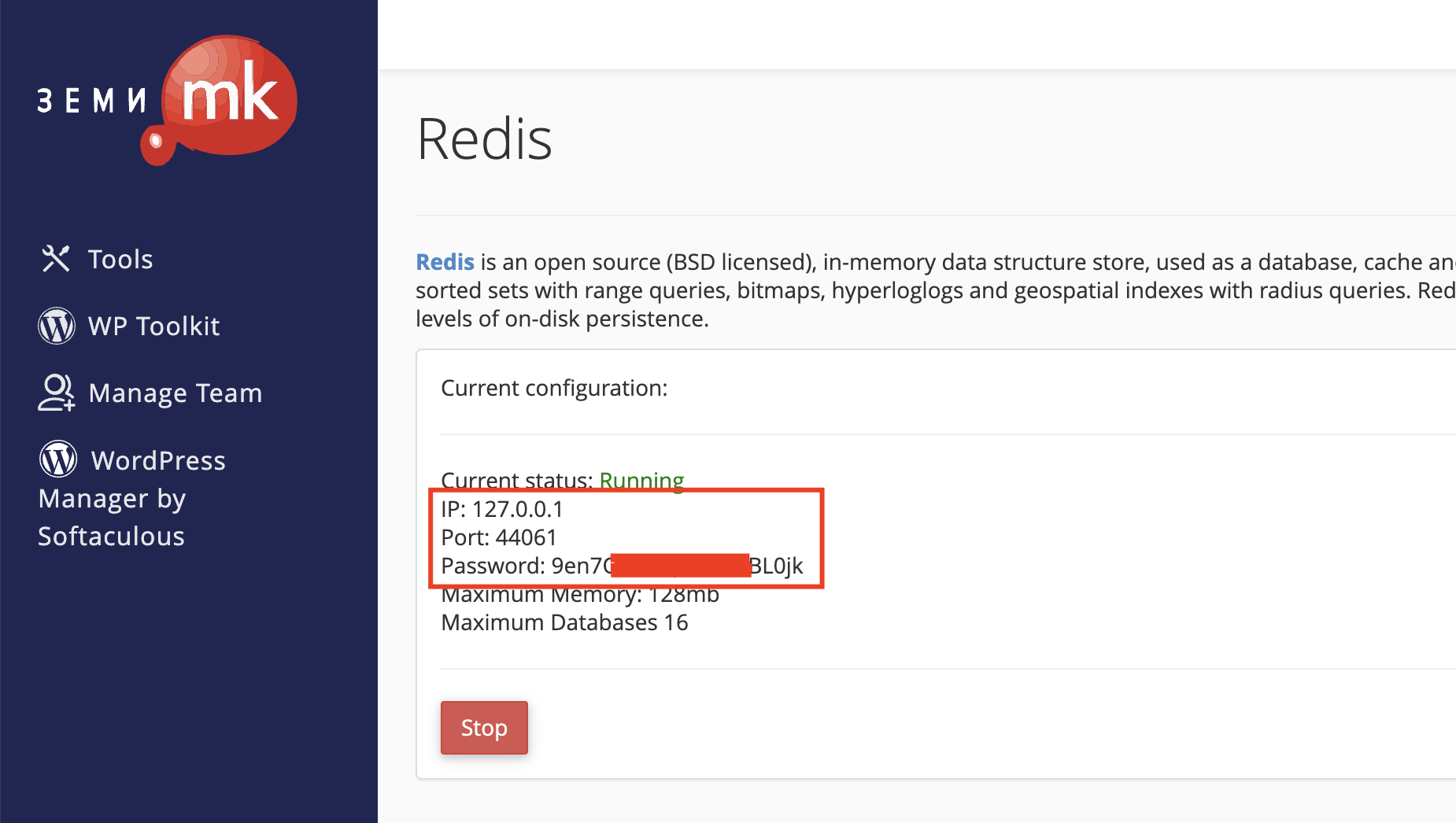
To begin, log in to cPanel, open the Redis tool, and click “Start”. Once started, a port and password will be generated for you.

redis-zemi-mk

After you receive these details, open your WordPress dashboard and, if you have not already done so, install the LiteSpeed Cache plugin. ([https://wordpress.org/plugins/litespeed-cache/](https://wordpress.org/plugins/litespeed-cache/))

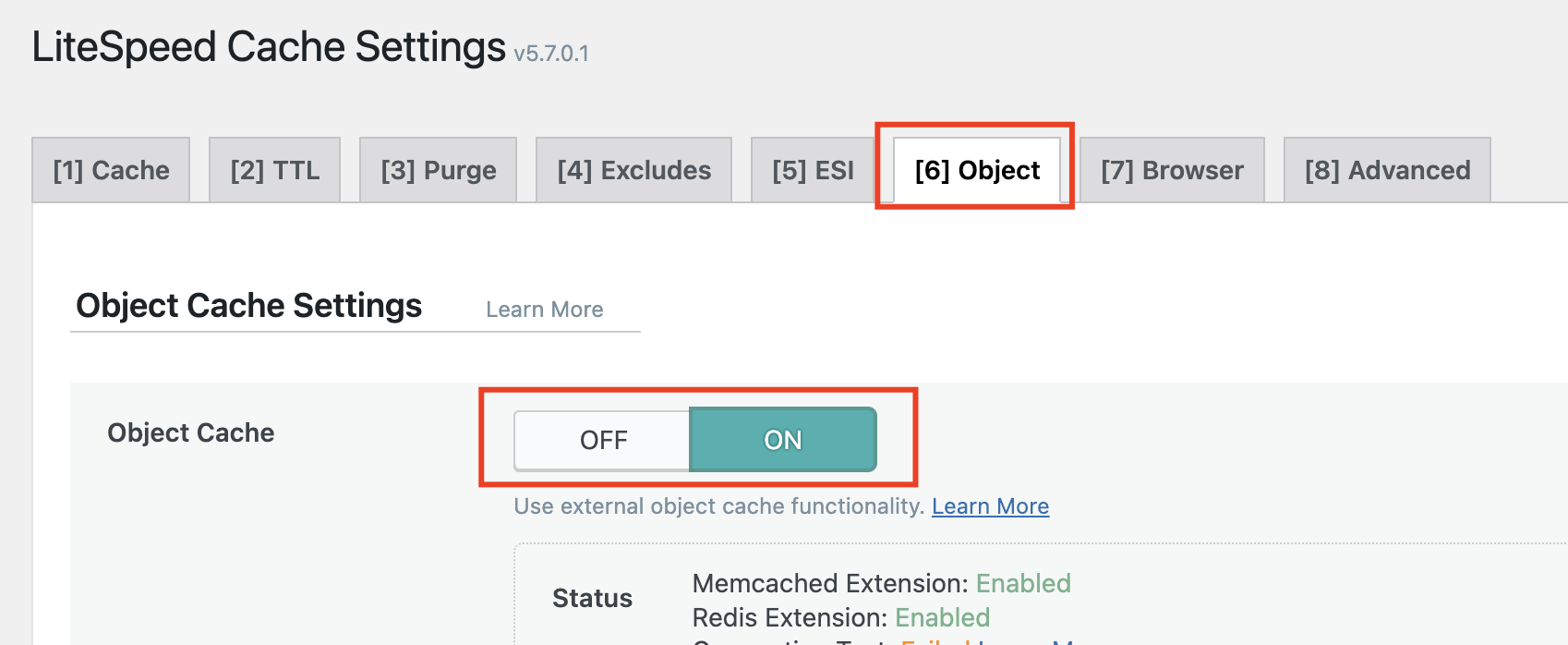
After installing the LiteSpeed Cache plugin, open its settings, go to the Object tab, and click ON to enable it.

litespeec-cache-redis-zemi-mk

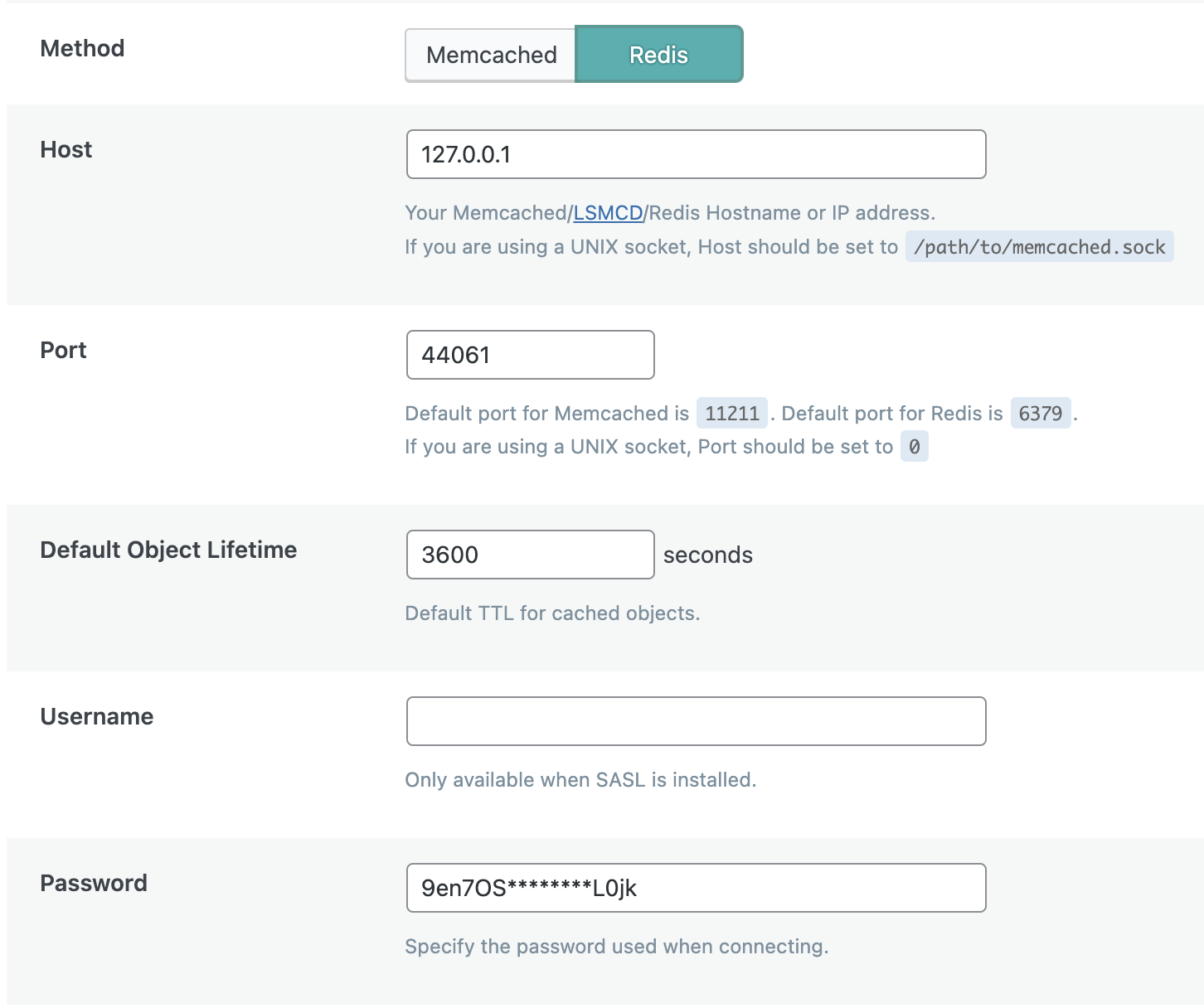
In the settings, choose Memcached or Redis — in our case, Redis — and enter the details you received earlier. Leave the Username field empty and click “Save changes”.

redis-za-wordpress-lscache-zemi-mk

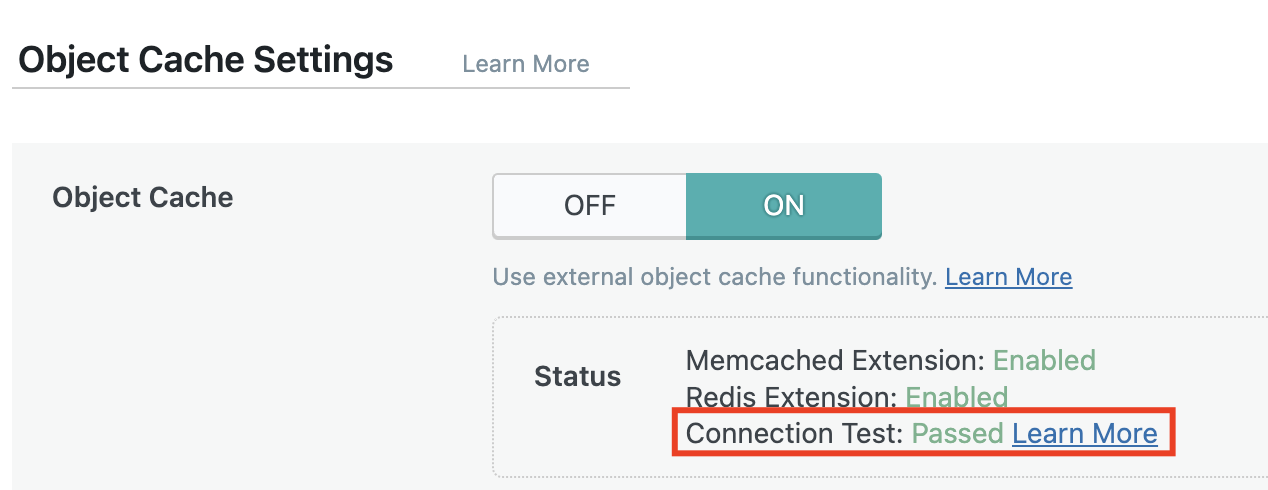
If the setup is successful, the “Connection test” section will show “Passed”.

connection-test-redis-zemi-mk

Optimizing a WordPress website requires technical knowledge. However, below are several additional simple tips you can follow even without your web developer.

Once you have configured Redis or Memcached caching, proceed with removing unnecessary plugins. A large number of plugins can significantly slow down the loading of any WordPress website. Plugins such as UsageDD and Plugins Garbage Collector can help you identify problematic plugins and processes.

Enable CloudFlare for your website. You can read how to activate CloudFlare in the following post: [https://zemi.mk/blog/kako-da-aktiviram-cloudflare/](https://zemi.mk/blog/kako-da-aktiviram-cloudflare/)

Activate Gzip Compression. You can do this through the Optimize Website tool in cPanel or by adding the following rules to your .htaccess file:

<IfModule mod_deflate.c>
# Compress HTML, CSS, JavaScript, Text, XML and fonts
AddOutputFilterByType DEFLATE application/javascript
AddOutputFilterByType DEFLATE application/rss+xml
AddOutputFilterByType DEFLATE application/vnd.ms-fontobject
AddOutputFilterByType DEFLATE application/x-font
AddOutputFilterByType DEFLATE application/x-font-opentype
AddOutputFilterByType DEFLATE application/x-font-otf
AddOutputFilterByType DEFLATE application/x-font-truetype
AddOutputFilterByType DEFLATE application/x-font-ttf
AddOutputFilterByType DEFLATE application/x-javascript
AddOutputFilterByType DEFLATE application/xhtml+xml
AddOutputFilterByType DEFLATE application/xml
AddOutputFilterByType DEFLATE font/opentype
AddOutputFilterByType DEFLATE font/otf
AddOutputFilterByType DEFLATE font/ttf
AddOutputFilterByType DEFLATE image/svg+xml
AddOutputFilterByType DEFLATE image/x-icon
AddOutputFilterByType DEFLATE text/css
AddOutputFilterByType DEFLATE text/html
AddOutputFilterByType DEFLATE text/javascript
AddOutputFilterByType DEFLATE text/plain
AddOutputFilterByType DEFLATE text/xml

# Remove browser bugs (only needed for really old browsers)

BrowserMatch ^Mozilla/4 gzip-only-text/html
BrowserMatch ^Mozilla/4.0[678] no-gzip
BrowserMatch \bMSIE !no-gzip !gzip-only-text/html
Header append Vary User-Agent
<ifModule mod_gzip.c>
mod_gzip_on Yes
mod_gzip_dechunk Yes
mod_gzip_item_include file \.(html?|txt|css|js|php|pl)$
mod_gzip_item_include mime ^application/x-javascript.*
mod_gzip_item_include mime ^text/.*
mod_gzip_item_exclude rspheader ^Content-Encoding:.*gzip.*
mod_gzip_item_exclude mime ^image/.*
mod_gzip_item_include handler ^cgi-script$
</ifModule>


Optimize the images on your website. For this, you can use a plugin such as Smush – Optimize, Compress and Lazy Load Images.

Optimize the WordPress database with the WP-Optimize plugin.

Minify JS and CSS files by using the Autoptimize plugin.

To check your website’s performance during the optimization process, you can use services such as:

[https://gtmetrix.com](https://gtmetrix.com) [https://developers.google.com/speed/pagespeed/insights/](https://developers.google.com/speed/pagespeed/insights/) [https://tools.pingdom.com](https://tools.pingdom.com)

Source:

Use your discount coupon from our WordCamp Skopje flyer within the next 30 days and get a 90% discount on the new “Tauren WCSK Pro” package, featuring increased LVE limits compared to the standard “Tauren Pro” package.

Each user may use the coupon only once. Any order for a second package using the same coupon will be refunded, and the package will be suspended.

The coupon is intended only for new users. Domains that have already been hosted within the Zemi.mk network cannot be hosted on the “WCSK Pro” package. If it is determined that domains previously hosted on Zemi.mk are being hosted on a newly purchased “WCSK Pro” package, the package will be suspended and the funds refunded.

Zemi.mk reserves the right to disable the coupon if misuse is detected.