Zemk.mk – Блог

Posts in the Инфо category

Recently, through the Zemi.mk service, you can also create email addresses without needing to log in to cPanel or the corresponding web panel.

All you need to do is log in and go to the control panel.

From there, if you want to create the free email address you received with your .mk domain registration during the “summer promotion”, click the “gear” icon next to the desired domain.

The domain management page will then open. Part of this page is the email address creation component. Enter how you want your email address to appear in the empty field; the domain is automatically selected for you, then click “Create”.

Your email address is now created. Copy the password that has been automatically generated for you and click the “Log in” link on the far right of the same row. You will then be redirected to the page where you can log in to your new email address.

When you log in for the first time, a new page will open where you can access your mailbox, change your password by clicking “Password & Security”, or click “Automatically configure my device” to view the settings for connecting your email address to a desktop or mobile email client such as Outlook, Gmail, Apple Mail, and others.

At the request of our users, we have added the option to assign a “manager” contact to each domain, both .mk and generic domains. This contact must be a Zemi.mk member and, after being granted the appropriate privileges, will be able to manage the domain from their own account.

This feature will make domain management easier for web designers and web design companies working with both their own domains and their clients’ domains. Now, all domains can be made available for management through their own Zemi.mk account, eliminating the previous need to log in to separate accounts in order to make changes to domains with different registrants.

To add a domain management contact, log in to the Control Panel, click “Details” for the desired domain, and immediately below the three main contacts you will find the field for adding the new manager contact. All you need to do is enter the email address used by the user you want to grant management privileges to when they registered on Zemi.mk.


In addition to the standard offer of .mk domains, Zemi.mk has also become a registrar for generic international domains.

You can view the pricing and the full list of all available domains for registration at the following link.

Among the most popular options, we highlight .com, .net, .org, and .co, which you can register for only 899 denars for a full year.

WordPress is a free, open-source content management system (CMS) based on PHP and MySQL. As the most popular platform for building websites, it is subject to a large number of attacks by hackers who try to use your server resources for their own purposes. Most compromised WordPress websites are used for sending spam messages or hosting phishing content, which can lead to servers being blacklisted globally.

Outdated versions of WordPress are increasingly compromised because of known vulnerabilities and bugs. WordPress updates are essential for the security and stability of your website. You should make sure that the WordPress core, plugins, and theme you use are regularly updated and are not pirated. The most common cause of virus-related problems on WordPress is the use of cracked/nulled themes and plugins.

The first step in protecting WordPress is to update it to the latest released version, regularly change login passwords, and delete plugins and themes that you do not use.

To avoid hacking, email abuse, spam, and viruses, follow these rules:

  • Update your WordPress CMS version, themes, and plugins to the latest version in order to protect your websites from known vulnerabilities.
  • Set a strong password for website administrator access and email accounts, and change your password regularly.
  • Do not keep unnecessary files on your hosting account.
  • Avoid having directories or files with 0777 permissions.
  • Scan your local computer with a good antivirus program.
  • In case of viruses, immediately change your email password.
  • Do not save your password in any email client or browser.
  • Scan your local machine, especially the system configured for email, for any malware or viruses.
  • Keep your operating system and antivirus software updated to the latest versions.
  • Change the passwords for cPanel, FTP, email accounts, and similar services.
  • Use FTP only when needed, and then delete the created FTP access accounts.

If your website is hacked, it is recommended that it be completely removed and recreated from scratch using the latest version of WordPress, a valid theme, and valid plugins.

If you do not know whether a specific plugin is good or not, read its reviews or search for comments about it through google.com.

If the server detects the presence of a virus, hacking activity, or spam sending, it may automatically suspend the compromised hosting account as a preventive measure against further unwanted activity.

If your hosting account has been suspended because of a virus, you need to contact us at [info@zemi.mk](mailto:info@zemi.mk) for reactivation.

Email is not only one of the oldest methods of online communication; it remains one of the most in-demand channels for electronic communication today and continues to evolve. Email is a popular way to promote your business and the easiest way for your clients and partners to connect with you, or simply to exchange information.

Hosting services from Zemi.mk allow you to create email addresses with your own domain. For example, if your domain is mojotubavsajt.mk, you can create an email address such as [moeime@mojotubavsajt.mk](mailto:moeime@mojotubavsajt.mk).

What are the benefits of an email address with your own domain?

  1. With this type of email address, your clients can find you more easily and contact you at any time.
  2. You will have access to your email from anywhere, at any time, and from any device.
  3. In addition to accessing your email through a browser, you can also access it through an email client on a desktop computer or smartphone.
  4. An email address with your own domain adds credibility and trust among your clients, partners, and everyone you communicate with by email.
  5. Your email address will be recognizable and easy to remember.
  6. You will have full control over your email service.
  7. You can create an unlimited number of email addresses that include the name of your website or company.

How to create an email address with your own domain?

First, log in to the control panel using the login details sent to you in the welcome email. The login link is vasiotdomen.mk/cpanel.

After logging in, from the list of cPanel tools, select “Email Accounts”.

1

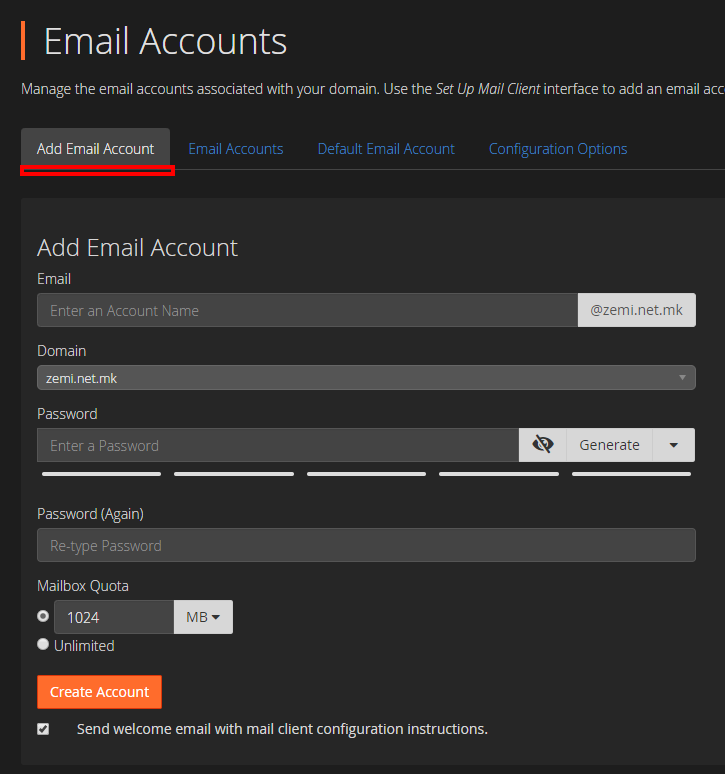
Then click the “Add Email Account” tab and fill in the fields to create a new email address with your domain. “Mailbox Quota” allows you to limit the size of the mailbox. Enter the amount of storage space you want to assign to this email address, or select “Unlimited” for an unlimited mailbox size.

ef0edd39f0e51b89c238e0b1a6500b7f


How to check your email through a browser?

If your domain is mojdomen.mk, go to mojdomen.mk/webmail, enter your email address and the password you set during creation, and access your mailbox.


How to set up your email address in an email client such as Microsoft Outlook, other desktop clients, or smartphone email apps?

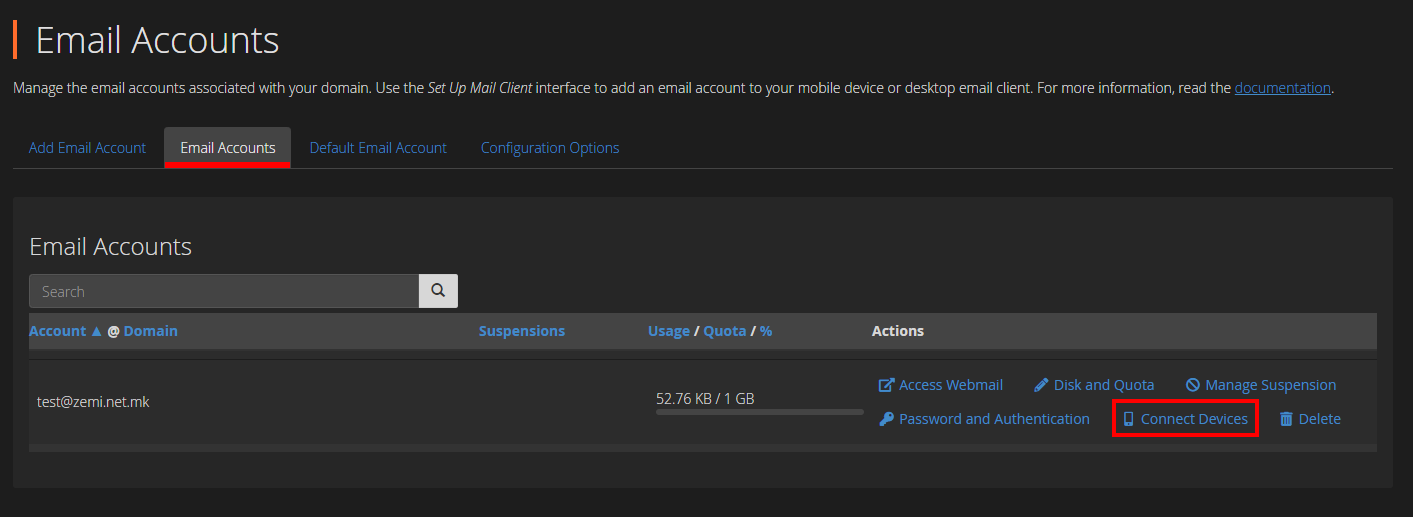
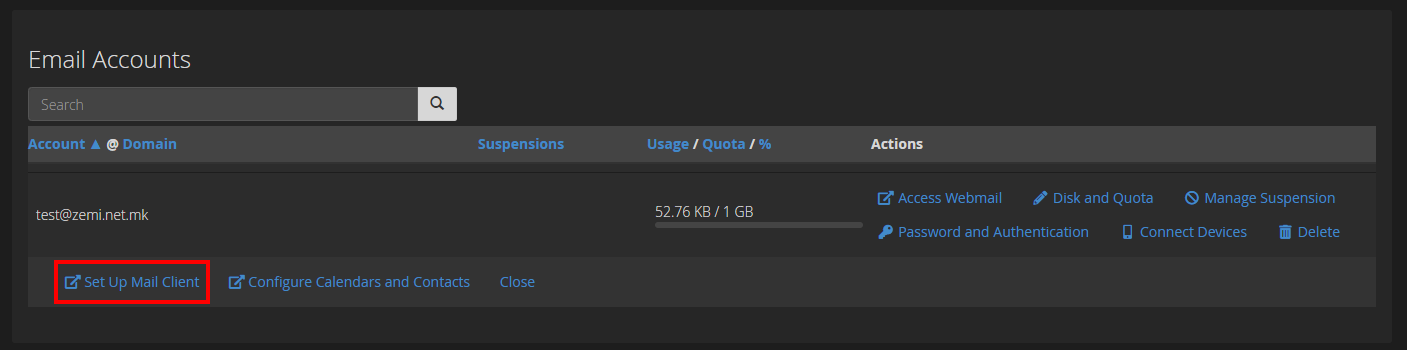
To set up your email address in an email client, you need the Incoming and Outgoing mail servers. To view them, go to the “Mail Accounts” tool in cPanel. From there, for the desired email address, click “Connect Devices”, then click “Set Up Mail Client”.

67de5b20f1171183d690afacaf53be73

b89f1e654f15f3d32ad3acd2e930460c

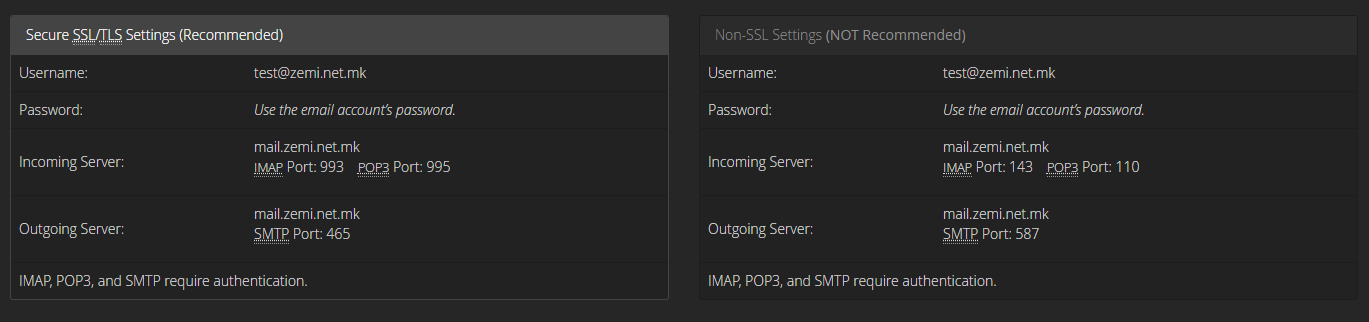
Here you can view your IMAP Incoming servers, as well as your SMTP Outgoing servers. Our recommendation is to always use the IMAP protocol.

a48512054688cc1cb8cca175e6a84f30

The authorized .mk domain registrar and web hosting provider, Zemi.mk, upgraded its platform a few days ago. In addition to the standard functionalities required for its operations, Zemi.mk has introduced a new partner program.

The partner program is divided into three tools.

  1. Domain Market.

The Domain Market is an opportunity for all webmasters and domain traders to list their domains for sale at a standard or premium price. If someone searches for your domain that has been listed for sale, they will be shown the price you entered, with the option to contact you regarding the purchase of the domain.


  1. Partner Program / Affiliate Program.

If you have a larger number of domains that are sitting unused but still receive visitors, or if you run a portal and need a new earning channel, you can enable the partner program for your domain and place a Zemi.mk advertising banner, or simply redirect visitors to the unique link that will be generated when you activate the program. If one of the referrals from your link purchases a service from Zemi.mk, you will receive monetary compensation.


  1. Freelancer.

Zemi.mk Freelancer is now available for all freelancers. Create your own portfolio and offer your services to a highly targeted group: users of Zemi.mk services. Profiles are listed on the Zemi.mk homepage as well as during domain searches. If someone needs the services you offer, they can contact you by message.

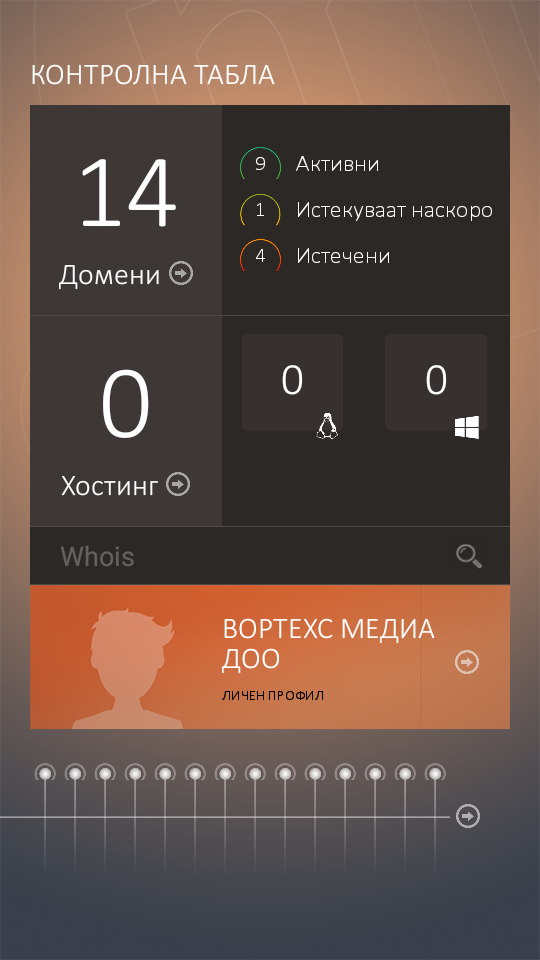
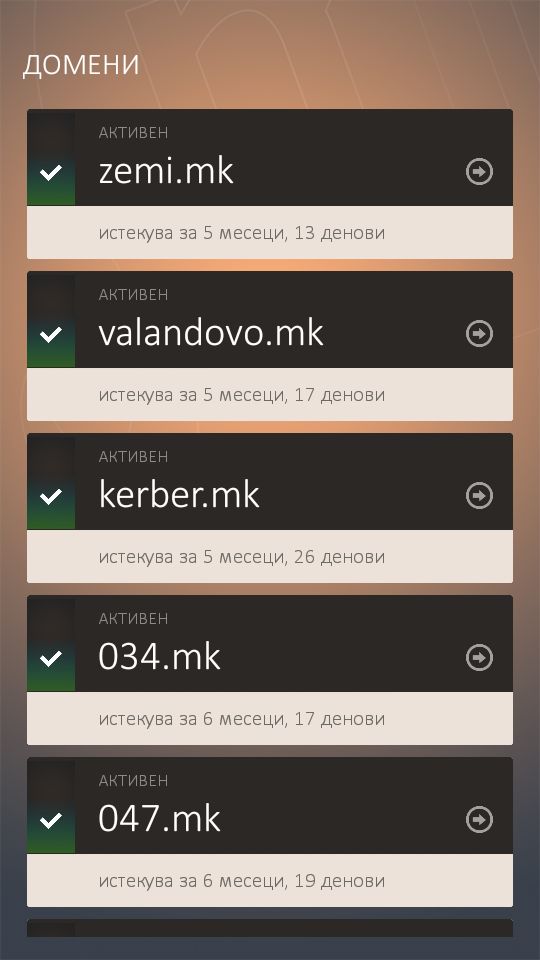
Recently, the Zemi.mk mobile application also became available to all Android smartphone users. The app offers users the simplest way to renew services on the go with online payment, change nameservers, and update details for .mk domains. As an additional feature, the app allows you to enable the “UP-Time” robot for each domain and receive notifications if your website becomes unavailable, along with other options. The iOS version of the application is expected to be released soon.

In addition to these updates, Zemi.mk has also received a new modern design.

All of these changes are aimed at creating a Macedonian “one-stop” platform for webmasters. Alongside the recent upgrades, the Zemi.mk team has also announced additional improvements that are expected to be released gradually in the coming period.

It is our great pleasure to present the Android application for managing your Zemi.mk services :).


screenshot_2016-11-22-13-27-40 screenshot_2016-11-22-13-27-51


If your .mk domains are already on the right platform, Zemi.mk, and you own an Android phone, we warmly recommend installing the application. By logging in with your Zemi.mk username and password, you can receive notifications on your smartphone at any time about the expiry of your domain or web hosting package.

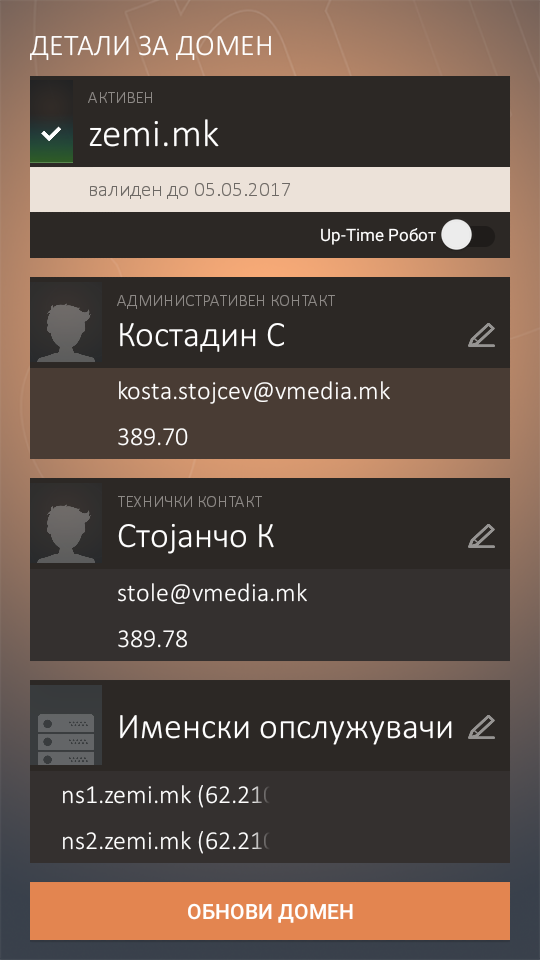
In addition to expiry notifications for Zemi.mk services, we have also created the “Up-time Robot”, designed to check whether your website is publicly available or requires your attention. With the Up-time Robot, your websites are automatically checked every 5 minutes to confirm whether they are accessible. You can enable or disable it separately for each domain.

We have also enabled service renewals through the application with online payment, as well as changes to domain details such as technical or administrative contacts and nameservers.


screenshot_2016-11-22-13-28-52 splash


Through the application, you can also search for .mk domains with a detailed WHOIS report.

You can download it from the following link, or search for it on Google Play using the keyword “Zemi.mk”.

The application was developed by Vortechs Media DOO, Valandovo.
Development: Aleksandar Manev
Design: Stole Kitanovikj
Web Service: Kostadin Stojchev

Domain renewal on Zemi.mk is done by payment card or by invoice through the system’s control panel. Click here to access the control panel.

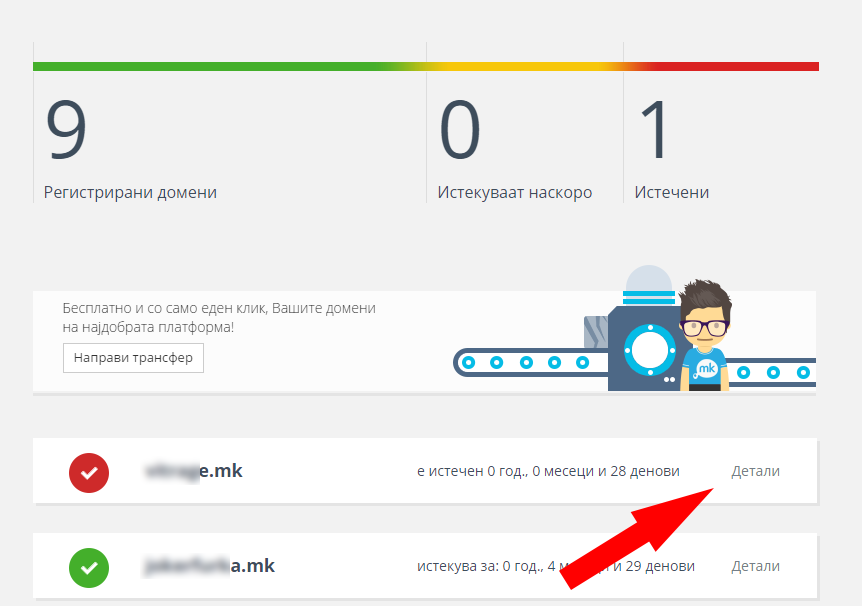
Then, from the list, click the “Details” link for the domain you want to renew.

detali

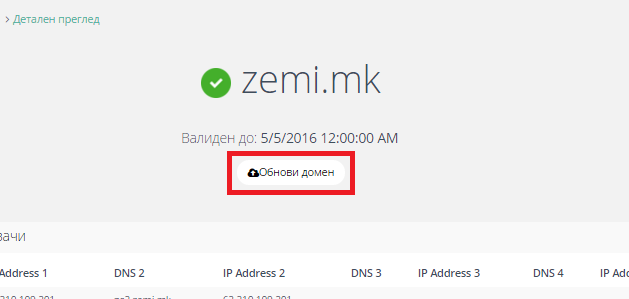
On the newly opened page, click “Renew domain” under the domain’s validity date.

obnova

From there, select how many years you want to renew the domain for, choose the payment method, and proceed to the payment section.

The procedure is the same for all domains in the .mk zone (.mk, .com.mk, .org.mk, .net.mk, .inf.mk), as well as for the .мкд national Cyrillic domain.

In the recent period, we have received information and indications that certain registrars may still be acting according to outdated practices that are not aligned with the currently valid Rulebook on the Organization and Management of the National Top-Level Internet Domains issued by MARnet.

This is not a minor technical issue. It is a matter of legal certainty, validity of registration, and protection of the registrant. A domain registered without a properly submitted request, without appropriate identification, and without complete documentation represents a real risk for the user, even if it is technically active at the moment. The rulebook clearly states that for domain registration each registrant must submit a request, and a separate request must be submitted for each domain name.

The new rulebook was adopted by the MARnet Management Board on 25 November 2024. The text itself states that it enters into force and applies from the date of publication, while authorized registrars were given 60 days to align with it and with MARnet’s special acts. In practical terms, this means that from 11 February 2025, acting contrary to the new rulebook becomes a serious compliance issue.

Who is allowed to register a .mk domain?

The rulebook provides that the right to register a name under the primary .mk domain belongs to all natural persons with residence or temporary residence in the Republic of North Macedonia and to all legal entities. For legal entities registered outside the country, the rulebook requires proper identification through the national registers of the country in which they are registered.

Who is allowed to register secondary .mk domains?

In addition to the primary .mk domain, the rulebook regulates the secondary domains .gov.mk, .edu.mk, .org.mk, .com.mk, .net.mk and .inf.mk. Each of them has clearly defined eligibility conditions.

.gov.mk

The right to register a name under .gov.mk belongs to state administration bodies, institutions and other organizations established by the Constitution and law, public enterprises, local self-government units, and the City of Skopje. In addition, the rulebook provides that MARnet has the right for its own needs and for the needs of state bodies and the public sector to register primary .mk, all secondary domains and .мкд, and to remain registrar for them. In practice, this means that MARnet is the registrar for government institutions, that is, for .gov.mk domains, while private registrars operate with businesses and citizens and may register all other domains for which the applicants meet the requirements.

.edu.mk

The right to register a name under .edu.mk belongs to legal entities registered for educational or scientific research activity, as well as foreign educational organizations authorized to perform such activity in the Republic of North Macedonia.

.org.mk

The right to register a name under .org.mk belongs to nonprofit organizations, associations, foundations, centers, institutes, political parties, trade unions, public and private healthcare institutions, funds, as well as foreign embassies and missions and foreign nonprofit organizations authorized to perform nonprofit activity in the Republic of North Macedonia.

.com.mk, .net.mk and .inf.mk

The right to register a name under these secondary domains belongs to commercial companies, sole proprietors, entities with public authority, chambers, cooperatives, financial organizations, legal entities, and individuals registered to perform commercial activity. The rulebook does not expressly prohibit foreign legal entities here.

In short for foreign applicants: foreign legal entities may register .mk, and may also register .com.mk, .net.mk, and .inf.mk if they fall within the permitted categories, while foreign natural persons may not directly register .mk unless they have residence or temporary residence in the Republic of North Macedonia.

What does the rulebook require for registration?

The rulebook is clear: for domain registration, each registrant must submit a request, and a separate request must be submitted for each domain name. The request is a prescribed form publicly published on the MARnet website and on the websites of authorized registrars.

The request must contain the core domain data, registrant data, administrative and technical contact data, and at least two nameservers with properly configured records for the domain. More importantly, the rulebook expressly provides that the request must be submitted in written or electronic form, in accordance with the Law on Electronic Management and Electronic Services and the Law on Electronic Documents, Electronic Identification and Trust Services.

Appropriate supporting documentation must also be attached. For natural persons, the rulebook requires either inspection of a personal identification document or appropriate electronic identification under the applicable law. Only the change of nameservers is treated as an operation that may also be requested via email or a dedicated web application. For all other changes, a proper and legitimate request must exist.

What are the risks if a domain is registered contrary to the rulebook?

The rulebook gives MARnet significant authority where there is suspicion that a domain has been registered or managed contrary to its provisions. MARnet may carry out temporary deactivation of a domain where there is serious suspicion that the domain was registered contrary to the rulebook. MARnet may also terminate registration and the domain may be deleted from the Register if it clearly establishes that the data are inaccurate or incomplete. In addition, if the authorized registrar or MARnet determines that the submitted data are inaccurate or the documentation unreliable, the domain may be deleted without the registrant’s consent.

This means that domains registered contrary to the rulebook applicable after 11 February 2025 are unsafe from the standpoint of legal certainty. They may be active today, but if MARnet requests access to the documentation and determines that there is no properly submitted request, valid identification, or credible archival record, such a domain may become subject to corrective measures, deactivation, or deletion.

Zemi.mk as a fully compliant registrar

At Zemi.mk, we have worked from day one toward full compliance with MARnet’s rules and the applicable legal framework for electronic submission, identification, and signing. For that purpose, Zemi.mk integrates an accredited electronic identification and signing scheme such as Evrotrust, enabling users to submit requests in a modern, secure, and legally compliant way.

This means that when you register a domain through Zemi.mk, you do not receive only an active domain. You also receive the assurance that the registration is backed by a properly submitted request, valid identification, and a process aligned with MARnet’s applicable rulebook.
Conclusion

A .mk domain is not merely a technical service, but a formal registration within the national domain system. That is why the manner of submission, the method of identification, and the quality of domain documentation are of fundamental importance.

If certain registrars are indeed still registering domains under outdated and invalid practices, that represents a serious risk for registrants. Such domains may be technically active, but legally and procedurally unstable.

At Zemi.mk, .mk domain registration is structured as a fully compliant process from day one — with a properly submitted request, valid identification, accredited electronic signing, and full compliance with MARnet’s applicable rulebook.